OAC
Optimising Performance in Oracle Analytics Cloud: A Deep Dive into Extracted Data Access Mode
The May 2025 update to Oracle Analytics Cloud (OAC) introduces a significant new feature designed to boost performance and reduce dependency on source systems: the Extracted data access mode. This new capability is…
The May 2025 update to Oracle Analytics Cloud (OAC) introduces a significant new feature designed to boost performance and reduce dependency on source systems: the Extracted data access mode. This new capability is especially valuable for enterprise users seeking to optimise dashboard responsiveness, reduce backend load, and deliver consistent performance across a variety of usage scenarios. In this expanded post, we’ll delve into what Extracted mode brings to the table, compare it with the existing Live and Cached modes, and offer guidance on how to get the most value from it.
Understanding Data Access Modes in Oracle Analytics Cloud
To fully appreciate the advantages of the new Extracted mode, it helps to revisit the existing data access modes in Oracle Analytics Cloud — namely Live and Cached. Each mode supports different use cases, with varying implications for data freshness, system performance, and architectural complexity.
Live Mode
In Live mode, Oracle Analytics executes every query directly against the source system in real time. Whether a user is exploring a dashboard, applying filters, or drilling into data, each action sends a query to the backend database.
Advantages:
- Delivers the most current, up-to-date data.
- No need to manage refresh schedules or data synchronisation.
- Well suited for operational reporting or scenarios requiring real-time insight.
Limitations:
- Performance is dependent on the source system's speed, load, and query optimisation.
- High concurrency or complex dashboards can introduce latency.
- Potential to introduce heavy load on transactional systems.
Cached Mode
Cached mode creates a temporary local copy of query results within OAC’s cache layer. This cache is generated on-the-fly when users first load a dashboard or perform a query and reused in subsequent interactions where applicable.
Advantages:
- Provides improved performance over Live mode by reducing repeated source queries.
- Helps to offload traffic from backend systems.
- Ideal for static or slow-changing datasets.
Limitations:
- Cache is unpredictable — built based on query patterns, not pre-defined schedules.
- May return stale data if the cache isn’t invalidated or refreshed.
- Limited reusability across users or sessions — each user's interactions influence their cache.
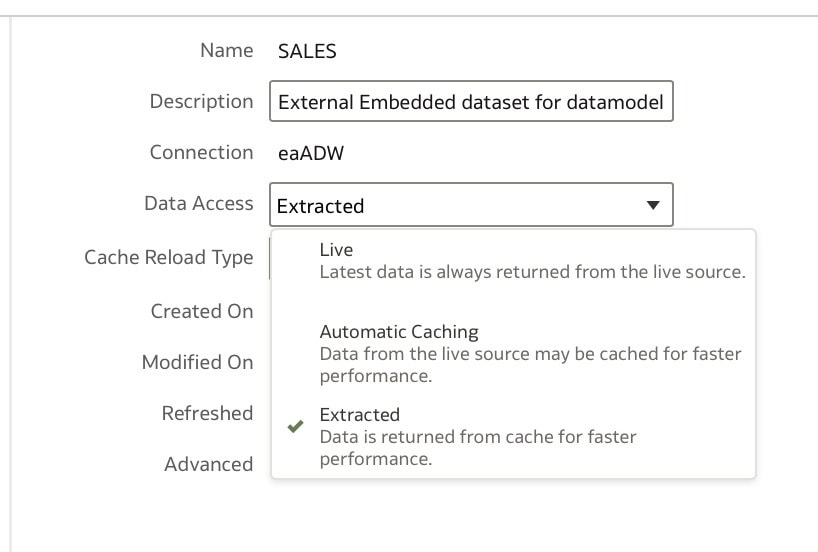
Introducing: Extracted Mode (New in May 2025)
The newly introduced Extracted mode provides a more structured and predictable alternative. It allows dataset creators to perform a full extract of data from a source system and store that extract directly within Oracle Analytics. Unlike Cached mode, this data snapshot is proactively managed and completely reusable.
Key Benefits of Extracted Mode:
- Delivers the highest performance, since all queries are resolved within OAC’s internal storage engine.
- Removes dependency on the source system’s availability or performance.
- Suitable for use in mission-critical dashboards, sandbox experimentation, and shared analytical content.
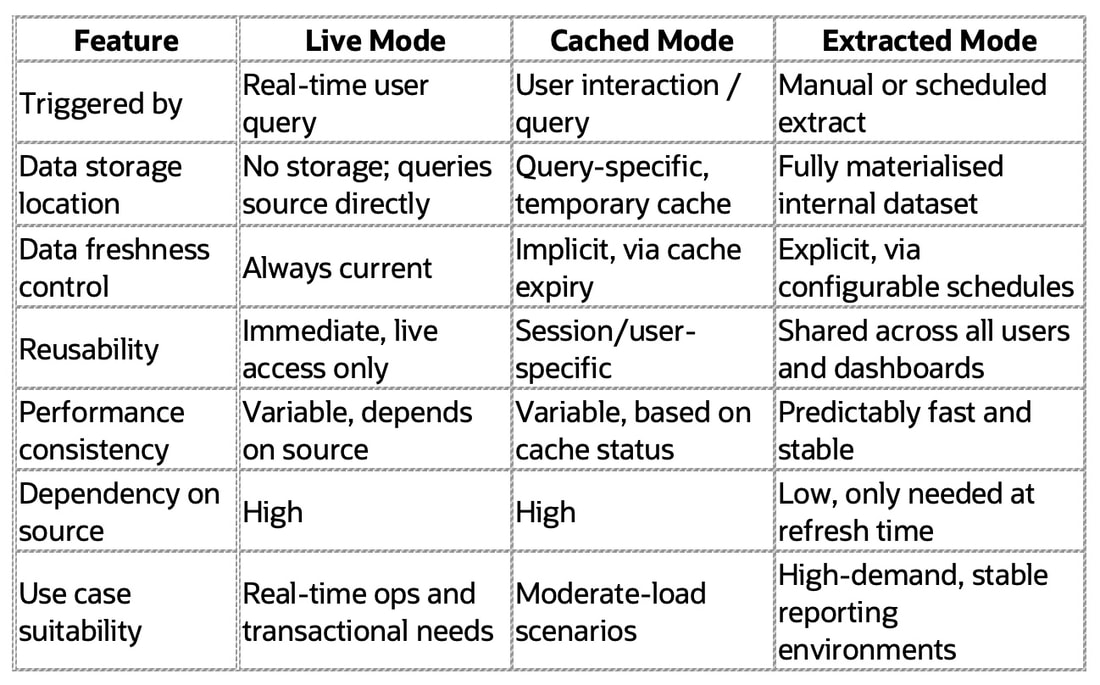
Comparison Table: Live vs Cached vs Extracted Mode
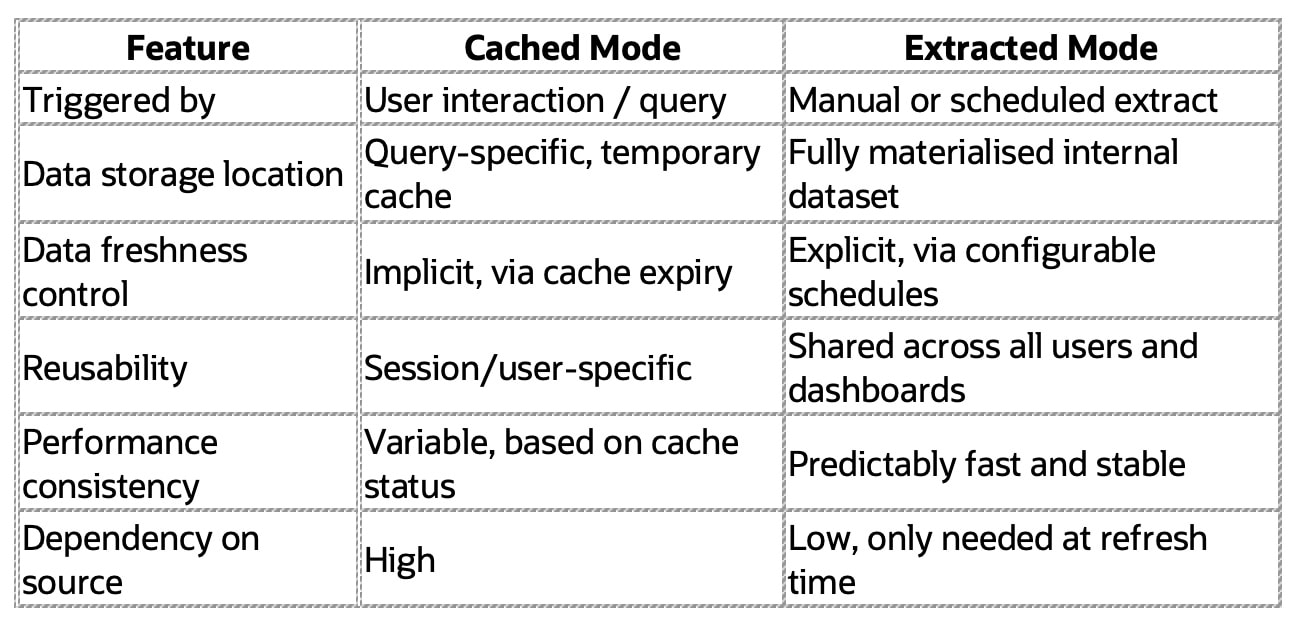
Cached vs Extracted Mode (Quick Reference):
Considerations:
- Extracted mode is not intended for near real-time analytics — data is as current as the last scheduled refresh.
- Storage consumption needs to be managed, especially in environments with many large datasets.
- Careful governance is required to ensure extract schedules align with business requirements.
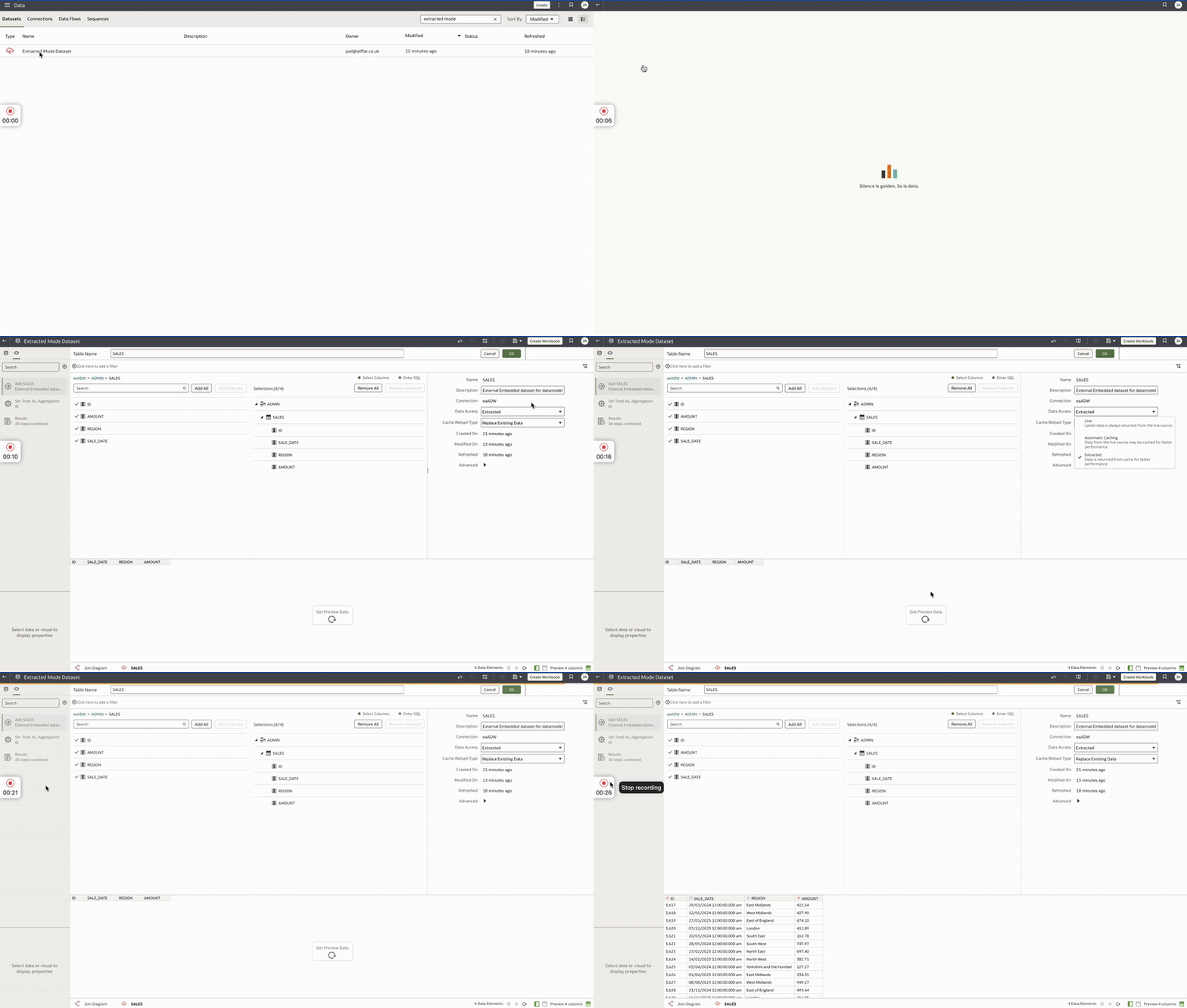
Creating and Managing Extracted Datasets in OAC
Working with Extracted mode is a straightforward process within Oracle Analytics Cloud’s interface. Here’s a step-by-step guide:
- Start with a Dataset: Navigate to the Data page and create a dataset using your source connection (such as Oracle DB, ADW, or Fusion Apps).
- Select Extracted Mode: During the dataset setup, choose Extracted as the data access mode. You can also switch an existing dataset to this mode by editing its properties.
- Configure the Refresh Policy: Set a refresh schedule that reflects your data update needs — daily, weekly, or at custom intervals. Manual refresh is also available.
- Monitor and Maintain: The UI shows the last refresh time and status. You can also manually refresh the dataset or update the schedule as required.
- Use Across Projects: Once extracted, the dataset is immediately available for use in DV projects, data flows, and dashboards without re-querying the source.
Additional Tips:
- Use filtering at the dataset creation stage to limit extract size.
- Document the dataset’s intended use and refresh strategy.
- Use naming conventions to indicate refresh frequency (e.g. Sales_Extract_Daily).
Where Extracted Mode Shines: Key Use Cases
The benefits of Extracted mode become most apparent in high-demand or constrained environments. Here are several real-world examples where this mode adds tangible value:
- Executive and Board-Level Dashboards: These consumers demand instant insights. Extracted mode ensures consistent load times without reliance on backend performance.
- Training and Demo Environments: Great for isolated setups where live connections to backend systems are not possible or reliable.
- High-Concurrency Reporting: Shared content accessed by many users can overwhelm live systems — extracting the data removes that risk.
- Agile Development and Prototyping: Teams can iterate quickly without introducing noise into production systems or waiting for slow queries.
- Hybrid Scenarios: Combine Extracted mode for stable reference data with Live mode for transactional data to strike the right balance.
Best Practices for Extracted Mode
To ensure you get the best results from Extracted mode, consider these best practices:
- Right-Size Your Extracts: Avoid pulling unnecessary detail — summarised data is more performant and easier to maintain.
- Monitor Storage and Growth: Keep an eye on storage usage and growth trends, especially in environments with many datasets.
- Align Schedules with Business Needs: Overly frequent refreshes can add unnecessary load, while infrequent ones may risk data staleness.
- Establish Ownership: Assign responsibility for refresh schedules and storage oversight.
- Test Before Deployment: Validate dataset size, refresh time, and dashboard performance before promoting into production.