OBIEE
OBIEE 12c & Microsoft Windows installations
To the uninitiated, OBIEE 12c installations on Windows are very challenging to say the least. An #obihackers colleague who had the pleasure of working on an 11g - 12c OBIEE Windows OS upgrade, stumbled across these…



|
To the uninitiated, OBIEE 12c installations on Windows are very challenging to say the least. An #obihackers colleague who had the pleasure of working on an 11g - 12c OBIEE Windows OS upgrade, stumbled across these issues and we thought it would be a good idea to document them as well as the solutions of each of these issues. To start off, there is a contradiction in the documentation of the definition of parameters passed to the export_service_instance script (located in the $ORACLE_HOME/user_projects/domains/bi/bitools/bin directory) which is used to create a BAR (Business Intelligence Application Archive) file from an OBIEE instance. |
An Oracle article was referenced in a previous blog post of this blog. This document appears to contradict Oracle's OBIEE 12.2.1.4 Administrator documentation, which states what seems to be an incorrect parameter list.
It looks like this article is referring to the deprecated WLST scripts which were replaced in previous OBIEE 12c versions with the bitools/bin scripts, as this Oracle document confirms: Oracle Support Document 2463087.1 (OBIEE 12c: PROBLEM_EXPORTING_BAR_FILE error when exporting BAR file).
The export script calls an LCM (life cycle management) script. Rather than calling the export script in the bitools/bin directory, calling the LCM script directly worked when the bitools script didn't. To fix the bitools script, set the BI_PRODUCT_HOME variable to:
BI_PRODUCT_HOME=$ORACLE_HOME/bi
You will need to restart the OBIEE services to ensure that the new environment variable is picked up before running the export BAR script in the bitools/bin directory.
The export BAR file script log files can be found here:
$FMW_HOME\user_projects\domains\bi\bilogs\service_instances
If your Windows OS has a non-English locale, you are likely to have issues with the export failing with errors related to the security metadata held in the jazn-data.xml file:

Oracle Support Document 2565111.1 (OBIEE 12.2.1.4: Running exportarchive Failed with "Invalid byte 1 of 1-byte UTF-8 sequence" Error in OfflineJaznContentPlugin.log).
This document suggests that the encoding needs to be explicitly defined as an environment variable before the call to the export BAR file script. This unfortunately didn't work and the workaround was to set the value of this variable in the LCM export BAR file script, which is located in the $ORACLE_HOME/bi/modules/oracle.bi.servicelcm/scripts directory, not in the Java call of this script:
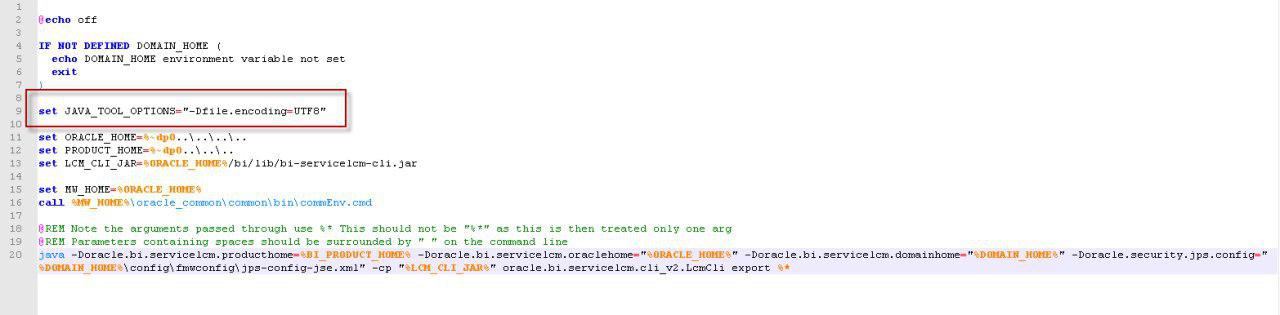
As you'll notice from above, the user experience of an OBIEE 12.2.1.4 Windows OS installation isn't the greatest. We live in hope that the imminent release of Oracle Analytics Server will rectify these issues highlighted above in this blog post with much easier installations less prone to these kind of issues.